
Choosing the Right Performance Appraisal Tool: Features & Pitfalls
Selecting a performance management system (sometimes called a performance appraisal tool or performance review software) is a high-stakes decision for any organization. The right choice can boost employee trust and engagement, but the wrong one can undermine your entire performance management process. HR leaders often flock to forums (Reddit, SHRM groups, LinkedIn discussions) asking for advice on what to consider, because no one wants to be stuck with a tool that employees dislike or that doesn’t fit their company. In this article, we’ll explore the key features to look for, common pitfalls to avoid, and a handy checklist to guide your decision. By the end, you’ll be better equipped to choose a solution that fits your culture and needs—ensuring you don’t regret your choice. (We’ll also mention how our SuiteVal platform aligns with these features, in case you’re evaluating options.)
Why Choosing the Right Tool Matters
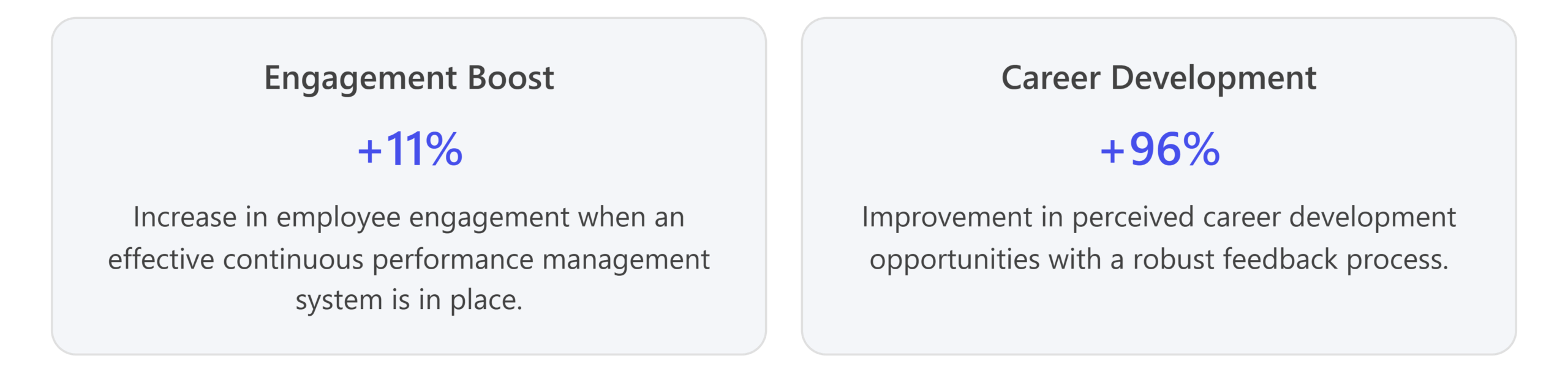
Choosing a performance management tool is pivotal to your organization’s success. A well-chosen system reinforces a culture of continuous improvement, fairness, and transparency. Research shows that effective performance management can tangibly improve outcomes – for example, companies implementing modern performance feedback have seen double-digit boosts in employee engagement and dramatically improved perceptions of career development opportunities. Conversely, the wrong software can erode trust in the process, leading employees to disengage or view reviews as a mere checkbox exercise.
To illustrate the impact: one study noted that introducing an effective continuous feedback system was linked to an 11% increase in employee engagement and a 96% improvement in employees’ perception of career development. That’s huge. It means more people feeling motivated and growing in their roles, just from getting the right kind of performance input. On the flip side, many HR professionals have learned the hard way that if a tool is clunky or doesn’t align with their culture, managers and employees simply won’t use it, and the entire initiative falls flat.
It’s no wonder HR leaders are cautious. They frequently ask questions like, “What should we consider so we don’t choose the wrong performance management software?” The consensus advice from seasoned professionals: make sure the tool aligns with your company’s needs and culture. Before even looking at vendors, clarify your performance management approach and pain points. Are you moving away from annual reviews toward continuous feedback? Do you need 360-degree reviews? How tech-savvy is your workforce? As one HR leader on a forum put it, there’s no universally “perfect” system – the best choice “depends on what you need and your company’s style”. In other words, the right tool for one organization might be the wrong tool for another, so you need to know what you are looking for.
In the next sections, we dive into seven key features you should evaluate in any performance appraisal tool, followed by common pitfalls to avoid. Keep these in mind as you review options.
Key Features to Look For in a Performance Management System
When comparing performance management tools, focus on the features that will determine whether the software truly supports and enhances your process. Here are seven essential factors to consider:
1. Customizability and Culture Fit
Look for a tool that can flex to fit your processes and company culture – not force you to change your ways. One of the biggest mistakes is choosing an inflexible “one-size-fits-all” system. Every company has its own performance management style, competencies, and lingo, and your software should accommodate that. Key questions to evaluate:
- Forms & Workflow Customization: Can you tailor the performance review forms and questions? The system should let you customize rating scales, competencies, and sections to reflect what matters in your organization. If you have unique core values or a specific review format, you want to include those. Also, check if you can adjust workflows (e.g., add an extra manager approval step or skip steps if not needed).
- Review Frequency & Types: Does it support your review cadence? Whether you do annual reviews, mid-year check-ins, quarterly OKR evaluations, or project-based reviews, the software should handle all relevant formats. It’s important that you’re not limited to a rigid annual cycle if you intend to do more frequent feedback.
- Branding and Terminology: Can the tool reflect your company’s identity? This includes using your company’s branding (logo, colors) and even terminology (for example, calling an evaluation “Check-in” instead of “Review” if that’s your style). A subtle but important aspect is that the system feels like it’s part of your company, not an alien process. Some top tools allow full white-labeling, meaning the interface can show your logo and even reside on a custom URL. This helps with user adoption because employees see the system as an internal platform.
- Flexibility for Different Roles/Departments: Can it handle variations within your company? Perhaps engineering wants to do things slightly differently from sales. The system should be able to accommodate multiple templates or processes if needed (while still giving HR overall oversight).
A customizable tool ensures that you don’t have to bend your company’s culture to match the software. Instead, it adapts to you. For instance, our SuiteVal platform was built with high flexibility: you can edit or add questions and sections on your evaluation forms anytime, define your own rating scales (or even choose to go rating-less), and configure workflows to match how decisions get made at your company. SuiteVal even supports white-label branding, so when employees log in, it looks like a natural extension of your HR systems with your logo and colors. We also include features like bias check and normalization (e.g., if one manager tends to rate much lower than others, we flag and can adjust that) to ensure fairness. The goal is a tool that fits like a glove – from the language it uses to the steps in the process – so that your employees will embrace it rather than resist it.
2. Integration with Existing HR Tech
Seamless integration with your existing HR technology stack is another must-have. Your performance management system will work best when it can “talk” to the other systems your company uses, reducing manual work and ensuring consistency. Consider the following integrations:
- HRIS (Human Resources Information System): Does the tool integrate with your core HR database (e.g., Workday, SAP SuccessFactors, BambooHR)? This is critical for automatically syncing employee data, roles, departments, and manager relationships. You don’t want to manually import/export employee lists every time someone joins or leaves. A good integration means when your HRIS is updated (new hire, promotion, org change), the performance tool updates too.
- Single Sign-On (SSO): Does it support SSO (e.g., Azure AD, Okta)? SSO integration lets employees log in with the same credentials they use for other work systems. This makes access frictionless and more secure. Without SSO, users might avoid logging in simply because they forgot a separate password.
- Payroll or Compensation Systems: If you tie performance to compensation, can it integrate with those systems? For example, after performance reviews, you might export ratings or summaries to a compensation planning tool. Some performance management tools streamline this by connecting directly to merit planning or payroll systems, making it easier to implement pay-for-performance.
- Email & Calendar (Outlook, Gmail) Integration: This is often overlooked. Ideally, the system can send automatic email reminders for upcoming reviews or nudge managers to give feedback. Even better if it integrates with calendars to schedule check-in meetings or due dates. When integrated properly, updates and reminders reach people where they already communicate (their email or calendar), which boosts participation.
- Collaboration Tools (Slack, Teams): Newer performance platforms offer integrations with Slack or Microsoft Teams. For instance, a bot could remind an employee “Your self-assessment is due Friday” or allow a manager to quickly give feedback through a Teams chat. It’s not essential, but if your organization heavily uses these tools, such integration can drive engagement.
Integration prevents your performance management from happening in a silo. It ensures that performance data flows to where it needs to be and that using the tool fits naturally into your team’s daily work. If your performance software doesn’t integrate, you might end up with duplicate data entry and islands of information – for example, having to manually update employee records in two places or copy-paste goals from a goal-setting tool into the review tool. That’s inefficient and error-prone.
When evaluating vendors, ask them: “Which systems do you integrate with, and how?” The best providers will have a list of popular integrations and an API for anything custom. In the case of SuiteVal, being a cloud-based solution, it’s designed to slot into your existing environment with minimal fuss. There’s no software to install (just log in via your browser), and it sends automated notifications so that everything from goal-setting to review completion can be nudged along via email. While SuiteVal can function as a standalone platform, it’s ready to work with your HRIS data and authentication systems out-of-the-box. The easier it is to integrate a tool, the faster you can get it up and running and the more value you’ll get from it.
3. Ease of Use and Employee Adoption
The software you choose should be easy to use for all participants – HR, managers, and employees. User experience can make or break the success of a performance management system. Remember, this isn’t a tool just for HR; it will be used by every employee at some point. If it’s cumbersome or confusing, people will procrastinate using it or provide minimal input, defeating the purpose. Here’s what to pay attention to:
- User-Friendly Interface: Is the interface modern and intuitive? When you demo the product, notice if the navigation and layout make sense. Common actions (like starting a review, submitting feedback, or setting a goal) should be obvious. If you find yourself getting lost in menus or needing to reference a help guide for basic tasks, that’s a bad sign. Ideally, the design should be clean, not cluttered with too many features on one screen.
- Employee Self-Service: Can employees easily log in and use it without training? For instance, an employee should be able to update their goals, write a self-assessment, or request feedback from a peer with little guidance. If HR has to hold everyone’s hand through the steps, the tool is adding work, not reducing it. Many companies prefer tools that feel as easy as using a consumer app.
- Manager Experience: Managers are often the busiest users. Check if the tool makes a manager’s life easier or harder. For example, when a manager has 10 direct reports to review, does the system allow them to quickly toggle between reviews or see all their deadlines in one place? Look for features like writing assistance (suggested phrases), the ability to copy goals from last period to next, or one-click approvals of objectives – anything that cuts down time. If managers find the tool helpful, they’ll do more quality coaching through it.
- Minimal Administrative Overhead: From HR’s perspective, the tool should simplify your job, not complicate it. That means features like automatic notifications (so you don’t have to chase people), one-click summary report generation, and integration (discussed above) to avoid data double-entry. If you currently use spreadsheets or email to manage reviews, moving to a tool should feel like a relief, not just a digital replica of those manual processes.
One best practice is to involve a sample of end-users during the trial or demo phase. Get a few managers and employees to test the interface and give feedback on the user experience. They might spot clunky aspects that you overlooked. Remember a comment from an HR peer: if the new system doesn’t actually make the performance review process easier or more pleasant, people won’t use it and will be disappointed. Ease of use isn’t a “nice-to-have” – it’s fundamental to adoption. A fancy system that no one uses is worse than a simple system everyone uses.
SuiteVal, for example, was designed with simplicity in mind. We know that for many, performance reviews are already stressful, so the software shouldn’t add frustration. The interface is clean and straightforward, and we automate rote tasks like sending reminders and collecting approvals. Many tasks that used to require HR follow-up (like nudging someone to finish a feedback form or consolidating results) are handled automatically by SuiteVal. This means managers and employees can focus on the content of feedback, not the mechanics of the tool. The feedback we often hear is that “it just works” and even busy managers find they “don’t mind using it” because it actually saves them time in the process.
4. Support for Continuous Feedback and Modern Practices
Performance management has evolved. It’s no longer just about an annual review and a rating. Many organizations are shifting toward continuous feedback, regular check-ins, and a growth-oriented approach. If you adopt a modern tool that supports these practices, you can future-proof your performance management process. Here’s what to look for:
- Continuous Feedback Mechanism: Can people give feedback outside the formal review cycle? The tool should allow or even encourage managers and peers to provide feedback or recognition at any time. For instance, a feature where anyone can record a note of praise or constructive feedback that gets logged for later would enable ongoing dialogue. Continuous feedback can also include things like lightweight monthly check-in forms or a “journal” for each employee where notes can be added.
- 360-Degree Feedback: Modern performance management often involves peers, direct reports, or even customers providing input, not just the direct supervisor. If you plan to do 360 reviews or even simple peer feedback requests, ensure the tool supports multi-rater feedback. It should be easy to select reviewers and gather their input anonymously (if desired).
- Flexibility in Review Cadences: You may want to run different types of reviews: annual full reviews, mid-year check-ins, quarterly goals reviews, project-end reviews for project teams, etc. A robust tool will allow multiple types of forms and processes and not lock you into one cycle. For example, you might run an engagement survey or a quick “pulse” assessment within the same platform if it’s flexible enough.
Why is all this important? Because many legacy HR systems (and even some newer ones) are still primarily designed for the old-school annual appraisal. Using them can inadvertently reinforce an outdated approach. In fact, HR experts warn that if your software isn’t built for continuous performance management, it will be a hurdle when you try to do things like frequent feedback or agile goal changes. You don’t want a tool that holds you back from evolving your performance culture.
If your company already practices continuous feedback, the need is obvious. If not, it’s worth considering a tool that can accommodate it so you have the option to evolve in that direction later. The workforce, especially younger employees, increasingly expect more frequent feedback and coaching, and a rigid system will feel archaic to them.
SuiteVal fully supports modern performance practices. You can run an unlimited number of evaluations or feedback cycles without any additional cost or hassle. What does that mean? Say you want to do a quick mid-year mini-review in addition to your annual review – with SuiteVal, that’s easy to set up. Or perhaps you decide to implement monthly “pulse checks” where employees answer 3 questions about how they’re doing and what support they need; that can be done in the platform. Our clients use SuiteVal for everything from project feedback sessions to 30-60-90 day new hire check-ins, on top of traditional reviews. The system also allows you to schedule recurring feedback cycles or one-off surveys as needed. This flexibility ensures that as performance management trends continue to evolve, your tool will support – not hinder – those changes.
5. Reporting, Analytics, and Insights
An often underappreciated aspect of performance management software is the data it produces. All those goal updates, feedback notes, and review scores can generate valuable insights. When evaluating a tool, consider what kind of reporting and analytics it offers:
- Built-in Reports: What standard reports are available? Common ones include completion status (who’s done or overdue), rating distribution (how many 5’s vs 4’s, etc.), top and bottom performers by various criteria, goal achievement rates, etc. The tool should let HR easily see, for example, if one department is consistently late on reviews or if one team’s ratings are skewed.
- Custom Reports and Filters: Every organization might want to slice data differently. Check if you can filter or create custom reports. For instance, can you pull a report of average performance scores by department, or see if any demographic group is rating higher or lower? The ability to filter by date range, by manager, by role, etc., adds a lot of flexibility in analysis.
- Visual Dashboards: A good system will have an HR dashboard that visualizes key metrics (possibly via charts or graphs). This could include things like an engagement or performance heatmap, trends over time, or even a 9-box (performance vs potential) if you do talent reviews. Visual data helps in quickly communicating insights to leadership.
- Calibration Tools: Some systems help with performance calibration – that is, ensuring consistency and fairness in ratings. While actual calibration meetings are a human process, software can assist by highlighting anomalies (e.g., one manager’s average rating is 4.8 while another’s is 3.2). Advanced analytics might even flag potential bias (for example, if a particular gender or ethnic group is consistently rated lower or higher, which might warrant a closer look).
- Exportable Data: You may want to do your own analysis in Excel or feed data to a business intelligence (BI) tool. Check if you can export the raw data easily. A CSV export of all responses and scores can be useful for custom analysis or record-keeping outside the system.
- Privacy and Access Controls in Reporting: Remember that performance data is sensitive. The tool should allow you to control who sees what in reports. For example, managers might see reports only for their team, while HR sees everything. Ensure the system has the necessary permissions so that insights can be shared appropriately without exposing private info.
Why care about analytics? Because the end goal is not just to complete reviews, but to use the information to make better people decisions. Whether that’s identifying high performers for promotion, spotting common skill gaps to address with training, or ensuring your process is fair, the data is what tells the story. If a tool can’t easily give you those insights, you might find yourself exporting data and spending days crunching numbers manually – defeating the purpose of having software assist you.
SuiteVal provides real-time reporting and analytics capabilities. At any point, you can generate reports on any evaluation cycle. For example, after a review cycle, you can instantly see completion rates, average scores by department, or even compare how different teams rated competencies (perhaps Team A excels in “Innovation” while Team B lags, indicating a need to share best practices or training). We offer visual dashboards and even advanced features like bias analysis – if certain supervisors consistently give lower scores, SuiteVal can flag that and let you adjust or be aware of it. All data can be exported for further analysis if needed. The main point: with SuiteVal or any robust system, your performance management data becomes actionable. It’s not just locked in PDFs or forms; it’s available to help inform decisions in promotions, training, and strategy.
6. Scalability and Future-Proofing
You want a solution that will serve you well now and in the future. It’s important to think ahead to ensure the tool can scale with your organization and adapt to changes over time:
- Handling More Employees: Can the system handle growth in headcount? If you plan to double in size in a couple of years, make sure the software (and the vendor infrastructure) can handle that. Cloud-based systems usually scale well technically, but also consider cost – how does pricing work as you add more users? Be aware of pricing tiers or per-user costs that might explode your budget later. Some vendors might negotiate a multi-year deal; just ensure you won’t be penalized harshly for growth.
- Adapting to Process Changes: What if you change your performance management approach? For example, today you might be doing annual reviews with numeric ratings, but next year you decide to do rating-less reviews with quarterly check-ins. Will the software support that shift? A highly configurable tool will. If the tool is too rigid, any major change in your process might force you to find another system (which is costly and painful). Ask vendors for examples of how clients have changed their usage over time – it’ll give you a sense of the system’s flexibility.
- Feature Updates and Innovation: The HR tech space is evolving, with new ideas like AI coaching, sentiment analysis, skills mapping, etc. While you might not need all that now, it’s good to know if the vendor is forward-thinking. Do they regularly update the product with new features or improvements? Look for a product roadmap or recent feature releases. A stagnant product could become obsolete in a few years. You want a vendor who’s investing in enhancements, ideally influenced by customer feedback.
- Global and Compliance Readiness: If your company is growing globally or might do so, check if the system supports multiple languages, time zones, and data privacy laws (like GDPR). Scalability isn’t just user count, but also being able to handle complexity as you grow (e.g., different performance cycles in different regions, or local legal requirements for employee data).
- Vendor Viability: Consider the vendor’s track record. Are they financially stable? Do they have a growing customer base? You don’t want them to go out of business or stagnate. It can be worth checking reviews or getting references to see if customers are generally happy over the long term.
Think of it this way: you’re not just buying a tool for this year’s reviews, you’re potentially entering a partnership for the next 5+ years. So try to envision whether the tool will still be a good fit a few years down the road. Many organizations sign 2-3 year contracts for these systems, so factor in future needs now. As one expert advised, “choose something that’s going to evolve with you” so you’re not forced to rip-and-replace in a couple of years.
Scalability and flexibility have been core principles in SuiteVal’s design. Whether you have 50 or 5,000 employees, the system performance remains snappy (thanks to scalable cloud infrastructure). We also offer unlimited usage – there are no hidden charges for more evaluations or additional modules as you expand your usage. This means you can pilot new processes (like a new feedback form or an engagement survey) within SuiteVal without worrying about extra fees. We continually update SuiteVal with new features (often driven by feedback from HR teams we work with) so the platform stays current with best practices. Our goal is that once you implement SuiteVal, it can grow and adapt with you for the long term, reducing the chance you’ll ever need to switch again.
7. Vendor Support and Customer Success
Lastly, don’t underestimate the importance of the vendor’s support and partnership. Even the best software can fail if it’s not implemented well or if you don’t get help when issues arise. Performance management touches all your employees, so the rollout and ongoing management need to be smooth. Consider these aspects:
- Onboarding & Implementation Assistance: Find out what the implementation process is like. Does the vendor provide a dedicated onboarding specialist or team to help configure the tool to your needs? Do they assist in migrating any historical data (if you need that) or perhaps uploading your employee list and setting up basic settings? A good vendor will often have a “concierge” service or implementation package to guide you through initial setup, because they know every company’s needs are a bit different. Also ask about the timeline – a typical implementation might take a few weeks; be wary if it’s many months (unless you have an enormous company with complex needs).
- Training & Resources: Will they train your HR team and perhaps your managers? Some provide live training sessions or webinars, as well as tutorial videos and help articles. This is crucial in ensuring admins know how to use all the features (so you get your money’s worth) and end-users aren’t confused when they log in.
- Customer Support: After you’re live, what support can you expect? Check the support hours (some offer 24/7 support for global clients). Is it via email, chat, phone? What’s the typical response time? You can often gauge this from reviews – if a vendor has poor support, other customers will probably mention it. You want to feel confident that if something goes wrong during your appraisal cycle, the vendor will be there to help immediately.
- Account Management: Do you get a dedicated account manager or customer success manager? Many vendors assign a representative who periodically checks in, informs you of new features, and helps you get the most value. This is a good sign of a vendor that cares about long-term success, not just the sale.
The point here is: you’re not just buying software, you’re entering a relationship with the vendor. Especially for something as culturally important as performance management, you want a vendor who will partner with you to make the program successful. If the tool is great but the support is lousy, you could end up frustrated or not fully utilizing the system. Many HR folks share stories about buying a product that technically had lots of features, but without proper guidance they only used 20% of it – a waste of potential. Don’t let that happen to you.
At SuiteVal, we take customer success very seriously. Every new client gets concierge onboarding, meaning our team (with experienced HR tech professionals) works with you one-on-one to configure everything to your liking. We help import your data, set up your first evaluation cycle, and even assist in tweaking the wording of your forms if needed. We also provide live training sessions for your HR team and managers to get everyone comfortable. Once you’re up and running, our support team is available 24/7 for any questions or issues that come up. Plus, you’ll have a dedicated account manager who checks in to ensure you’re happy and to let you know about new features or tips. We essentially become an extension of your HR team during rollout. Our philosophy is that we succeed only if you succeed with the product, so we’re with you at every step to make sure that happens.
Common Pitfalls to Avoid
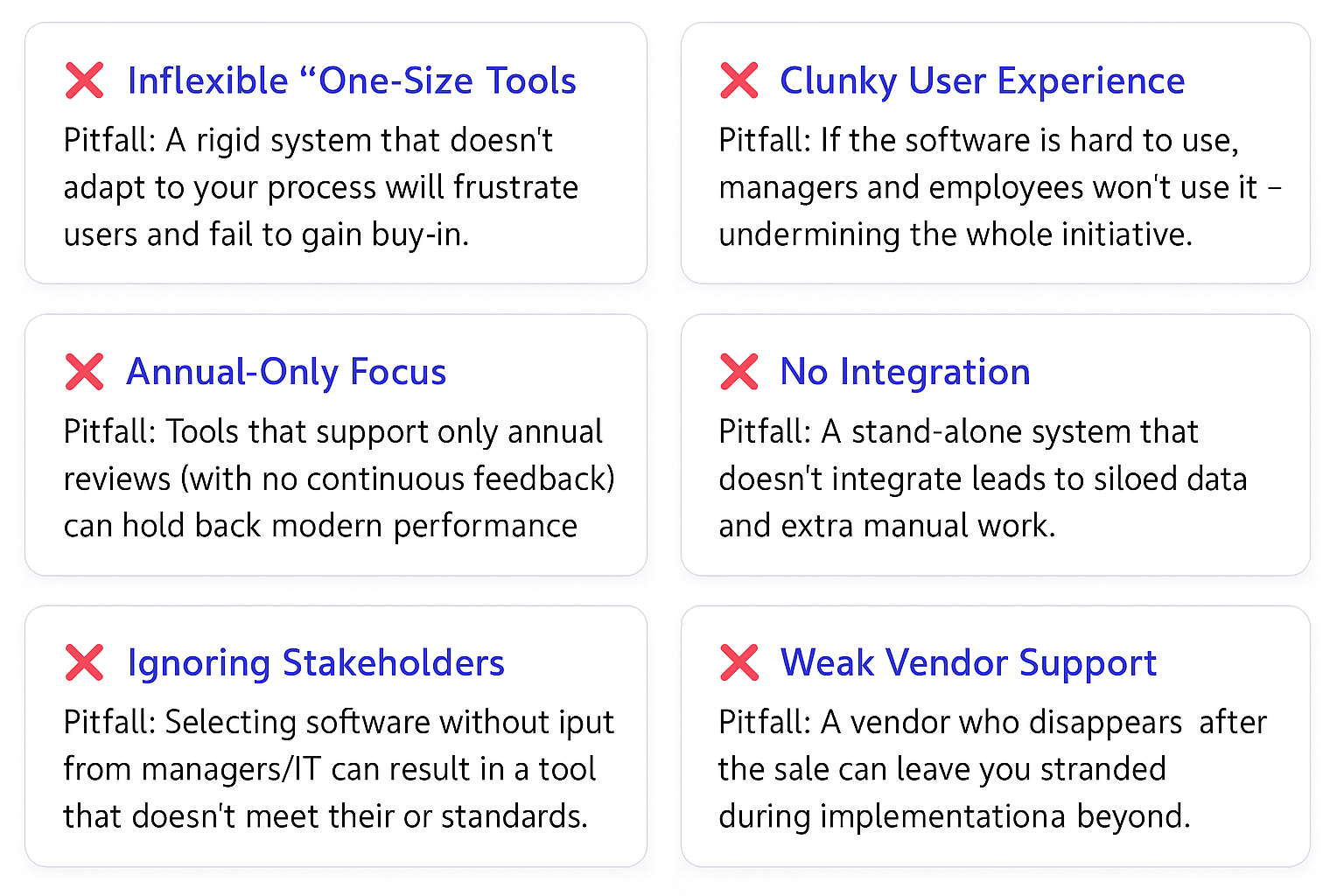
Even knowing what to look for, it’s possible to stumble into some common pitfalls when selecting a performance appraisal tool. Here are some mistakes that HR decision-makers often regret (and how to avoid them):
- Choosing an Inflexible, “One-Size-Fits-All” Solution: As mentioned earlier, a tool that can’t adapt to your process and culture is likely to face resistance. Pitfall: You buy a highly rigid system because it worked for someone else, but then you find it doesn’t align with your workflows or company values. Avoid it by prioritizing flexibility and asking during demos, “How would we do X in your system?” If the answer is unclear or convoluted, that tool might not be a fit.
- Ignoring User Experience (Poor Adoption): Some tools look great on a features checklist but are clunky in practice. Pitfall: Employees and managers find the system frustrating, so they procrastinate or give sparse feedback, undermining the whole purpose. One HR leader cautioned that if the system doesn’t actually make the process smoother, “people will likely end up disappointed with it”. Avoid it by test-driving the interface with actual end-users and choosing a tool that people enjoy or at least find easy to use. Check reviews for comments on usability.
- Lack of Continuous Feedback Capabilities: If you choose a tool that only supports annual reviews and has no features for check-ins or ongoing feedback, you might be locking yourself into a dated approach. Pitfall: A year down the line, you want to implement quarterly coaching sessions, but your software can’t handle it well – you’re stuck or have to supplement with other tools. Avoid it by opting for a system that supports continuous performance management (or at least doesn’t hinder it). Even if you don’t use all those features immediately, having them gives you flexibility.
- Overlooking Integration (Data Siloes): A performance system that doesn’t integrate with anything can become a dead-end for data. Pitfall: You end up manually updating employee info in the tool and manually extracting performance data to use elsewhere. HR spends a lot of time on admin instead of analysis. Avoid it by ensuring the tool can connect with your HRIS and other key systems. Ask about integration capabilities early – it’s not “just an IT concern,” it affects usability and accuracy of data.
- Not Involving Key Stakeholders: Maybe HR and the vendor’s sales team chose the tool, but managers, IT, or employees weren’t consulted. Pitfall: After purchase, managers say “this doesn’t report what I need” or IT raises security concerns, or employees find it doesn’t address their biggest pain point. Avoid it by getting input from a few managers, an IT rep, and even some employees during selection. This can be through surveys, having them join vendor demos, or at least gathering their requirements. Their buy-in will smooth the implementation.
- Underestimating Implementation & Change Management: Implementing performance software is not just a technical task; it’s a change for the organization. Pitfall: You choose a tool but don’t allocate time to properly configure it, train people, or communicate why it’s being used. Then adoption falls flat. Avoid it by treating the rollout as a project: work closely with the vendor on configuration, run a pilot if possible, train your teams, and explain to the whole company how this tool will help make performance conversations better. A good vendor will help with this – use their resources. Also, don’t schedule your go-live right at peak business times; give people a fair chance to pay attention to the new process.
- Focusing Solely on Cost Over Value: Budget matters, but the cheapest option isn’t a bargain if it doesn’t meet your needs (or no one uses it). Pitfall: You go with a low-cost vendor to save money, but the tool lacks critical features or support – and a year later you’re shopping again (incurring more cost). Avoid it by considering the total value: features, support, and potential ROI (like time saved, better performance leading to better results, etc.). Sometimes spending a bit more on the right system saves money in the long run (through higher productivity or avoiding the costs of switching again). That said, also be cautious of paying a premium for features you won’t use. Find the right balance.
- Neglecting Security & Compliance: This is a pitfall that can be costly if overlooked. Pitfall: You choose a tool without checking its security standards, and later discover it doesn’t comply with data protection regulations or, worse, it suffers a data breach of sensitive performance info. Avoid it by verifying the vendor’s data encryption practices. Have your IT/security team review the vendor’s security documentation before signing off.
By being mindful of these pitfalls, you can double-check your decision process. For each tool you consider, ask yourself if you’re falling into any of these traps. For example, are you sacrificing usability for a slight cost savings? Are you enamored by a glossy demo but haven’t thought about integration? Use the pitfalls as a counterbalance to the sales pitch – if a vendor claims to do everything, probe on these potential weak points.
(Avoiding these pitfalls will save you headaches and ensure your chosen tool actually delivers on its promises.)
Performance Management Software Evaluation Checklist
To help you further, here’s a checklist of features and questions to use when evaluating performance appraisal tools. Keep this list handy during vendor demos or when comparing options:
| Feature/Consideration | What to Look For |
| Customizability | Can the system be tailored to your process? Check for customizable review forms, rating scales, competencies, and workflows. It should adapt to your culture (e.g., incorporate your core values and terminology) without heavy IT work. |
| Integration | Does it connect with your HRIS/HRMS for employee data sync? Look for SSO support for easy login. Ask about integration with payroll, goal management tools, and communication platforms (email) for automated reminders and data flow. |
| Ease of Use | Is the interface intuitive for HR, managers, and employees? Try a hands-on demo: can a typical manager complete a review or give feedback without training? |
| Continuous Feedback | Does the software support continuous performance management? This includes features for ongoing feedback, one-on-one meeting notes, goal tracking throughout the year, and flexible review cycles (beyond just annual reviews). |
| Analytics & Reporting | What reporting features are included? Ensure it offers useful reports (completion rates, performance distributions, etc.) and possibly dashboards. Can you export data? Advanced analytics like identifying rating biases or performance trends over time are valuable for larger organizations. |
| Scalability | Will the tool scale with your growth? Consider both technical scalability (handling more users) and process scalability (supporting new types of reviews or changes in strategy). Understand the vendor’s update schedule – are they innovating and adding features regularly? |
| Vendor Support | What level of implementation help and ongoing support is provided? Look for a dedicated onboarding service, training materials, and responsive support (ideally 24/7). A vendor that offers a customer success manager or regular check-ins is preferable for long-term partnership. |
| Security & Compliance | Verify the vendor’s security credentials (encryption, data protection) and compliance with regulations. Also, ensure the system has proper user access controls so managers only see their team’s data, etc. Protecting sensitive performance data is essential. |
Use this checklist as a guide to compare each vendor side by side. You might score each criterion on a scale to quantitatively see which tool fits best. Also, consider weighting these criteria based on what matters most to your organization (for example, if you have a small HR team, Ease of Use and Vendor Support might be critical; if you’re in a highly regulated industry, Security might top the list).
Conclusion: Make an Informed Choice (and Set Your Program Up for Success)
Selecting the right performance appraisal tool is undoubtedly a big decision, but it doesn’t have to be daunting if you approach it methodically. By focusing on the features that align with your strategy and being aware of common pitfalls, you can choose a system that will genuinely enhance your performance management process rather than hinder it. Remember to keep your company’s culture and needs front and center – the goal is to find a tool that becomes a seamless part of how you develop and evaluate your people.
Take your time to trial options, involve others in the decision, and use the checklist above to stay organized. The effort you put in now will pay off when you have a smooth rollout and your employees and managers actually like the new system. Instead of dreading performance review season, your organization can turn it into a continuous conversation that drives improvement and engagement.
As you evaluate solutions, we encourage you to consider SuiteVal as one of your options. SuiteVal is built around all the principles discussed in this article. It’s fully customizable (so it will fit your unique process), integrates with ease, offers an intuitive user experience for high adoption, and supports continuous feedback with unlimited review cycles. You’ll get powerful analytics to make data-driven decisions, and it’s designed to scale with your organization. On top of that, we provide concierge onboarding and 24×7 support, ensuring you’re never on your own during implementation or when questions arise. We engineered SuiteVal to avoid the common pitfalls and to check every box on your features checklist.
Discover the SuiteVal Advantage
Empower your team with smarter, fairer performance reviews. SuiteVal streamlines 360° feedback, eliminates bias, and drives consistency across your organization.
- ✔️ Customizable workflows
- ✔️ Intuitive interface
- ✔️ Actionable analytics
Ready to elevate your review process?
Request SuiteVal DemoThank you for reading! We hope this guide helps you navigate your performance appraisal tool selection with confidence. If you have any questions about performance management best practices or want more information on SuiteVal, feel free to reach out. Happy evaluating, and here’s to a more effective and engaging performance review process ahead!